API testing tools
To check requests for payment creation via API, two methods are available.
Allpay API Tester
With Allpay API Tester, you can perform requests for new payment, refund, create subscription, and other operations in both live and test modes, emulating requests from your server.
Simply insert the API login/key of any integration created in the <span class="u-richtext-element">Settings</span> -> <span class="u-richtext-element">API Integrations</span> section, and fill out the form fields according to the API documentation.
If test mode is enabled for the integration, requests will be executed in the test environment.
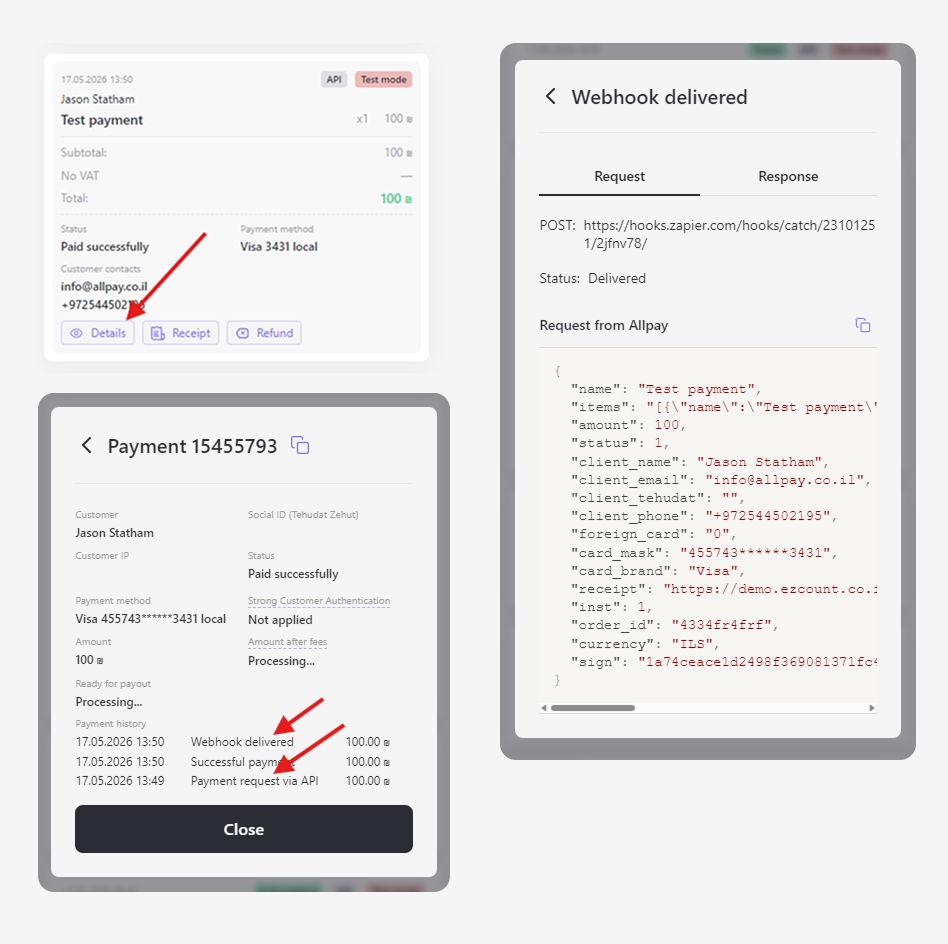
API request contents
The transaction details show its history. By clicking a history record, you can view the API request body and webhook.

FAQ
Can Allpay be integrated into a website created with AI?
Yes. Just as you used AI to build your website, you can ask AI to integrate payments via Allpay. See the recommendations and example prompts.
Do you have webhooks?
Yes, Allpay can send a webhook for a successful payment. Learn more.
Does your API support hosted fields?
Yes. Card input fields can be embedded into your website or app, fully adapting their design. Learn more about Hosted Fields.


